Create an app by describing it
Write what the app should do. iqobi builds a working preview, and every change you want is one more message.
From one sentence to a link
Describe it
Say what the app is for and who uses it. A sentence is enough. iqobi builds it and shows you a preview you can use.
Change it in your words
Ask for a new page, a vote or other colors. Each build that works becomes a version, so you can go back to an earlier one.
Share the link
Install it and choose who can open it: only you, the people you add, or anyone with the link. It opens on the web and in the iqobi app for iPhone.
What people make
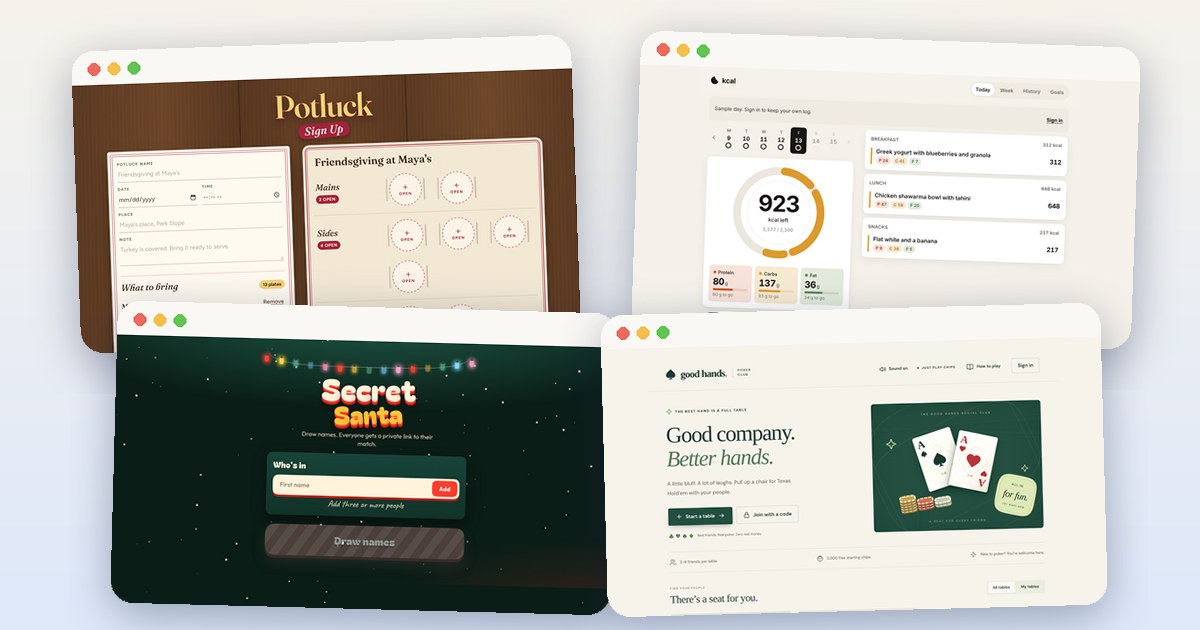
- Make a free potluck sign-up sheet: Make a potluck sign-up sheet for Friendsgiving, Thanksgiving, or the office. Guests open one link, claim a dish, and see what is still missing.
- Free Secret Santa generator for your gift exchange: Draw Secret Santa names for a family, office, or friends' gift exchange. Keep couples apart, set a budget, and send each person a private link to their match.
- Make a chore chart app for your family: Make a shared chore chart for your family. Set who does each chore and on which days, and check off this week’s work.
- Make your own calorie tracker: Log meals and see calories, protein, carbs, and fat in an app you made. Describe it and iqobi builds it. Try Kcal on this page.
- Free poker app to play Texas Hold'em with friends: Play Texas Hold'em with friends for play chips. Share a table code or practice against bots. Try Good Hands on this page, then make your own with iqobi.
- Make a website without code: Describe the website you want in plain words. iqobi builds it at its own web address that you can share. No code and no templates.
Questions
What can I make?
Small apps for you, your friends, your family or a team, such as a chore chart, a trip plan, a group poll or a potluck sign-up. Apps can use built-in tools for the weather, maps and AI answers.
Do I need to know how to code?
No. You write in plain words, and iqobi builds the app.
Can I start from an app someone else made?
Yes, when its creator allows remixes. Open the app in Explore and remix it. The remix copies how the app is built, never its data, and becomes your own app to change.
Can I change an app after I share it?
Yes. Write the change in Studio, then update the app. People keep the same link and get the new version. You can go back to an earlier version.
Who can open my app?
You choose when you install it, and you can change it later in Share. Private means only you. Shared means you and the people you add. Public means anyone with the link.
What does it cost?
You can start on the Free plan, with no card. The pricing page lists every plan.